
Rapid Design
Your Shortcut to MISUMI Components in SOLIDWORKS and Inventor
RAPiD Design™ is a free tool suite that accelerates CAD workflows by seamlessly integrating MISUMI components into SOLIDWORKS and Inventor. Say goodbye to platform switching and hello to faster, more efficient design.
Fill Out the Form to the Right to Download RAPiD Design
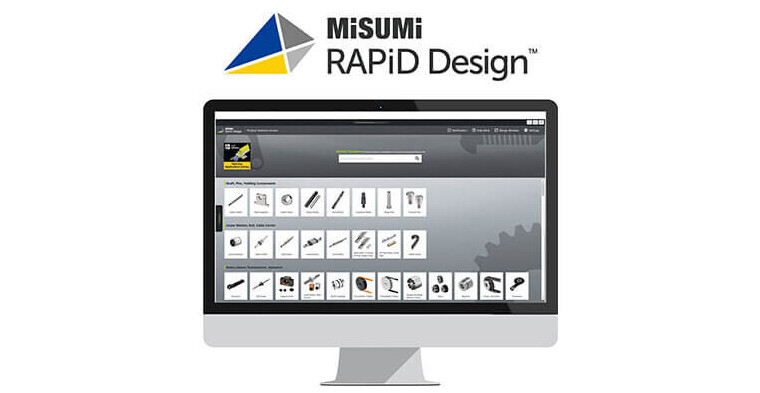


Why You Should Use RAPiD Design
Save Time—Focus on What Matters Most
Engineers thrive when they can concentrate on core engineering tasks—not on drawing or modeling standard parts. RAPiD Design delivers ready-to-use components, freeing up valuable time and boosting productivity.
Smart Part Numbering—No Manual Input Needed
Say goodbye to tedious part number management. RAPiD Design automatically generates part numbers based on your selected specs, keeping your workflow smooth and error-free.
Instant Access to Key Part Details
Each RAPiD Design part comes pre-loaded with essential information—material, supplier, pricing, and lead time—so you can skip the manual data entry and move faster.
Effortless Dimension Updates
Need to tweak a part? MISUMI’s configurable components let you update dimensions directly within your design window. The part number stays synced with the model, minimizing mistakes and rework.
Pre-Constrained CAD Files for Faster Assembly
Many parts arrive with built-in constraints, saving you the hassle of manually adding them. It’s plug-and-play efficiency for your CAD environment.
Streamlined Quoting for Custom Parts
RAPiD Design now integrates with meviy to support quoting for custom-designed components. Combine standard and custom part quotes in one seamless platform—no more juggling tools or timelines.
RAPiD Design Toolsets
Generate Bill of Materials
Get instant quotes and add parts directly to your MISUMI cart.

Favorites
Avoid the guesswork. Save your go-to parts and revisit your design history.

System Requirements:
- Operating System: Windows 11
- RAM: 8GB (Recommended)
- CAD Platform: SOLIDWORKS 2022–2026 and Inventor 2018-2026
- Internet Connection: Required for full functionality

Want to Learn More:
Click the Link Below to Email Us for a Live Demo of RAPiD Design or Ask Us Questions
TESTIMONIALS

Designed using RAPiD Design

Completed Assembly

“We love using MISUMI components in our builds because of the wide selection of high-quality parts and ease of customization. However, this flexibility also made creating CAD models difficult because models for new parts would need to be individually downloaded and incorporated if any changes were made. This was a huge time sink that was completely solved by RAPiD Design. Now we can change component specifications on the fly across an entire model without breaking constraints or transferring files. A BOM can be generated which includes the MISUMI components and properties. The MISUMI components can even be priced and added directly to the online cart from RAPiD Design once a design is complete. RAPiD Design has really streamlined our CAD process for custom designed systems.”
FAQ
- Operating System: Windows 11
- RAM: 8GB (Recommended)
- CAD Platform: SOLIDWORKS 2022–2026 and Inventor 2018–2026
- Internet Connection: Required for full functionality
Installation typically takes 1-3 minutes. For IT-related questions, contact: RapidDesign@miusumiusa.com.
Use your existing MISUMIUSA.com login credentials. Click here to create a MISUMIUSA.com login.
Yes, RAPiD Design uses the internet to:
• Reference CAD models • Provide pricing and lead times
There is no plan to provide an offline version at this time.
Yes, available languages include:
• English
• German
• Chinese
• Korean
• Japanese
To request access to these languages, contact: RapidDesign@miusumiusa.com.
Currently, 99% of MISUMI’s metric factory automation products line is available through RAPiD Design.
RAPiD Design does not include electrical components or die mold products.
No, RAPiD Design does include several third-party brands.
Yes, save your work directly through SOLIDWORKS and Inventor. RAPiD Design will still recognize the part.
Yes, shared files can be viewed and modified by others.
No, but replacing them with RAPiD Design files is quick and easy.
Yes, RAPiD Design generates native .prt SOLIDWORKS files and Inventor files.
No, only certain components (e.g., actuators, linear guides) are partially constrained.
Yes, RAPiD Design has been tested with leading PDM/PLM platforms.
When using the yellow “Import into a New Part” button:
- A new file is saved by default (does not replace the original file).
- You can choose to:
- Reduce file size (removes unused features and breaks RAPiD Design link)
- Overwrite the existing model
- These options are configured in the settings menu.
- Yellow Boxes: Default values not yet changed
- If yellow boxes remain when clicking “Model Generation”, a warning will confirm the use of default values.
Yes, however:
- You’ll receive a warning if the configuration is flawed.
- The part will be marked non-standard.
- A part number will not be generated, and saving through RAPiD Design will be disabled.
Yes, the part will be generated with a “non-standard” error and cannot be ordered.
No, SOLIDWORKS will show a collision error if parts overlap.
Yes, use the “Price/Delivery” tab within the Design Window.
Yes, RAPiD Design files behave like any other native SOLIDWORKS and Inventor models and are compatible with your macros.